@launchcurator
AI 에이전트와 함께 사용하는 브라우저: ego (lite)
AI 에이전트에게 브라우저 작업을 맡기려 하면 생각보다 많은 마찰을 만나게 됩니다.
자동화용 브라우저는 로그인 정보가 없는 빈 상태로 시작하는 경우가 많아, 사이트마다 다시 로그인하거나 2단계 인증과 SSO를 통과해야 합니다.
반대로 사용 중인 브라우저를 직접 제어하도록 연결하면 에이전트가 새 창과 탭을 계속 열거나 마우스 포커스를 가져가면서 사람의 작업과 충돌하기도 합니다.
“내가 사용하던 로그인 환경은 그대로 공유하면서, AI 에이전트가 내 브라우징을 방해하지 않고 일하게 할 수는 없을까?”
ego (lite)는 이러한 질문에서 출발한 AI 에이전트용 Chromium 브라우저입니다.
Chrome의 북마크와 확장 프로그램, 쿠키와 로그인 세션을 가져와 일상적인 브라우저처럼 사용할 수 있으며, Codex와 Claude Code, Cursor 같은 외부 AI 에이전트가 별도의 작업 공간에서 웹 자동화를 수행할 수 있도록 설계되었습니다.
사용자는 자신의 탭에서 계속 작업하고, 에이전트는 격리된 Space에서 페이지를 읽고 버튼을 누르거나 폼을 작성하고 파일을 내려받습니다.
무엇이 다른가?
ego (lite)는 AI가 내장된 브라우저나 별도의 헤드리스 브라우저를 실행하는 자동화 프레임워크와 조금 다른 접근을 취합니다.
사람과 AI 에이전트가 하나의 브라우저 환경을 공유하되, 서로의 작업 영역은 분리하는 것이 핵심입니다.
사람과 에이전트를 위한 하나의 브라우저
기존 브라우저 자동화 도구는 일반적으로 새로운 Chromium 인스턴스를 실행합니다.
이 브라우저에는 사용자의 로그인 정보와 확장 프로그램이 없기 때문에 Gmail, Notion, LinkedIn, 사내 관리자 페이지처럼 인증이 필요한 서비스에서 작업을 시작하기 어렵습니다.
ego (lite)는 온보딩 과정에서 Chrome의 열린 탭과 탭 그룹, 북마크, 저장된 비밀번호, 확장 프로그램, 쿠키, 로그인 세션과 프로필을 복사할 수 있습니다.
덕분에 에이전트는 매번 빈 브라우저에서 시작하지 않고, 사용자가 이미 로그인한 실제 웹 환경에서 작업할 수 있습니다.
가져오기 과정은 선택 사항이며 기존 Chrome 데이터를 이동하거나 삭제하지 않습니다. 가져온 이후에는 Chrome과 ego (lite)가 별도로 관리되므로 두 브라우저의 새로운 로그인이나 확장 프로그램이 자동으로 동기화되지는 않습니다.
에이전트 전용 작업 공간, Space
사용자와 에이전트가 같은 브라우저를 사용한다고 해서 같은 탭을 두고 경쟁하는 것은 아닙니다.
ego (lite)는 AI 에이전트의 작업마다 Space라는 별도의 작업 공간을 제공합니다.
Space는 새로운 브라우저 창이나 별도 프로필, 클라우드 브라우저가 아닙니다. 같은 ego (lite) 프로세스 안에서 작업별로 분리된 브라우저 컨텍스트를 만들고, 각 작업의 탭과 저장 공간을 격리하는 방식입니다.
에이전트가 Space에서 페이지를 이동하거나 폼을 작성하는 동안 사용자는 자신의 탭과 마우스 포커스를 그대로 유지할 수 있습니다.
여러 에이전트나 작업을 각각의 Space에서 동시에 실행할 수도 있습니다. 작업 중인 Space로 이동해 진행 상황을 살펴보거나, 필요할 때 직접 제어권을 넘겨받는 것도 가능합니다.
작업이 끝난 뒤에도 관련 탭이 남기 때문에 에이전트가 어떤 페이지를 방문하고 무엇을 수행했는지 확인할 수 있습니다.
사용하던 AI 에이전트를 그대로 연결
ego (lite)는 특정 내장 AI 모델만 사용하도록 제한하지 않습니다.
ego-browser라는 Skill을 통해 Codex, Claude Code, Cursor, Continue, Gemini CLI, Hermes Agent, OpenClaw, OpenCode와 자체 제작한 에이전트 등을 연결할 수 있습니다.
설치 과정에서 Mac에 있는 에이전트 CLI를 찾아 ego-browser Skill을 연결하며, 이후 에이전트에게 /ego-browser와 함께 원하는 작업을 자연어로 설명하면 됩니다.
예를 들어 로그인된 관리자 페이지에서 데이터를 정리하거나, 여러 상품의 가격을 비교하고, 소셜 미디어 게시물을 수집하거나, 반복되는 웹 테스트를 실행하도록 요청할 수 있습니다.
특정 모델이나 에이전트 플랫폼에 종속되지 않고 이미 사용 중인 코딩 에이전트에 브라우저 실행 능력을 추가한다는 점이 특징입니다.
한 번에 여러 동작을 실행하는 구조
많은 브라우저 자동화 도구는 페이지를 확인하고, 버튼 하나를 누른 뒤 결과를 다시 모델에 전달하는 과정을 반복합니다.
단계마다 모델과 브라우저 사이의 왕복이 발생하기 때문에 작업이 길어질수록 실행 시간과 토큰 사용량도 함께 증가합니다.
ego (lite)는 snapshot, fill, click, wait, navigate, capture 같은 브라우저 기능을 JavaScript 함수로 제공합니다.
에이전트는 여러 동작을 하나의 짧은 JavaScript 흐름으로 작성해 페이지 안에서 연속으로 실행할 수 있습니다. 단순한 명령을 한 번씩 호출하는 대신 조건문과 반복문을 포함한 작업 전체를 코드로 구성할 수 있는 방식입니다.
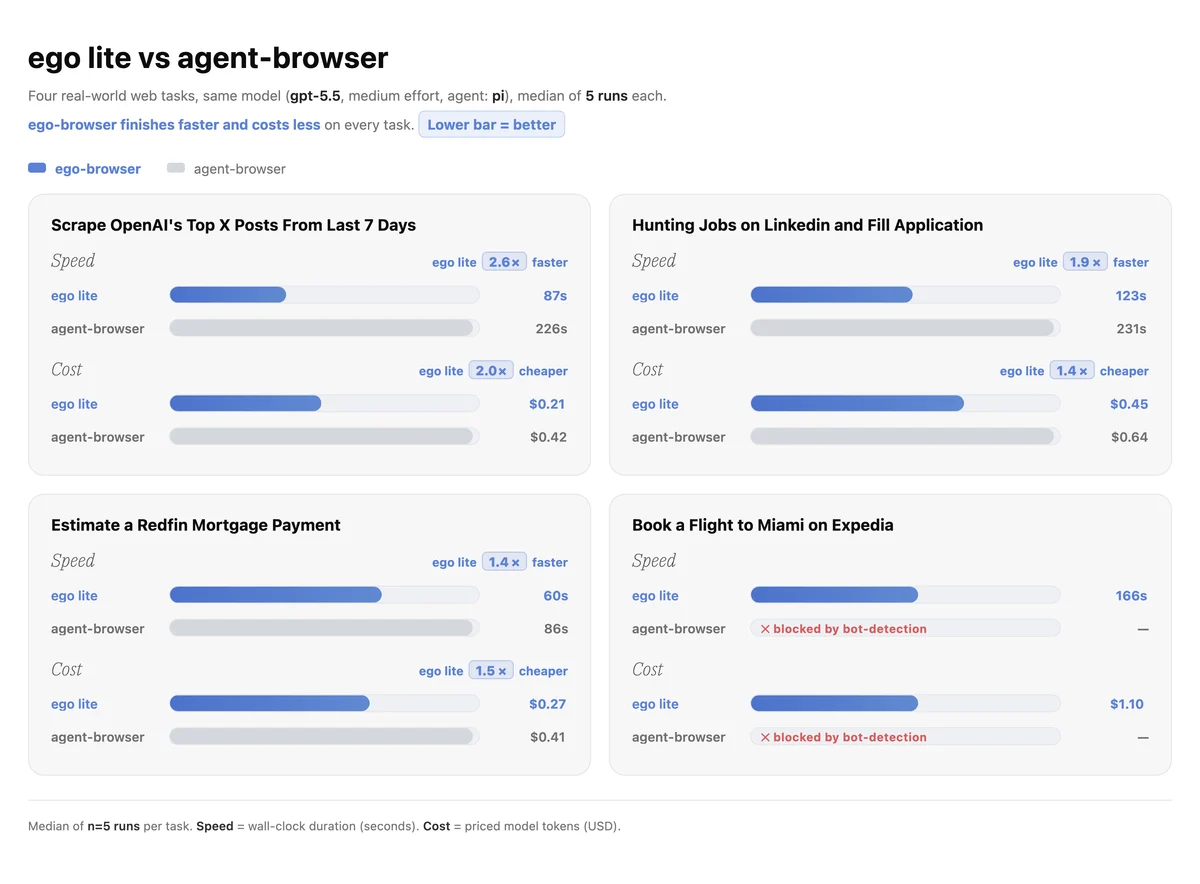
제작팀이 Vercel의 agent-browser와 네 가지 복합 작업을 비교한 자체 벤치마크에서는 작업에 따라 최대 3.45배 빠른 실행 속도와 더 적은 토큰 사용량을 기록했다고 설명합니다.
에이전트가 읽기 쉬운 Snapshot
웹페이지의 전체 HTML에는 스타일과 스크립트, 숨겨진 요소처럼 실제 작업에 필요하지 않은 정보도 포함되어 있습니다.
이를 매 단계 모델에 전달하면 입력이 지나치게 커지고, 에이전트가 클릭해야 할 요소를 찾기도 어려워집니다.
ego (lite)의 Snapshot은 페이지의 접근성 트리를 바탕으로 제목과 본문 구조, 버튼, 링크와 입력 필드 등을 압축된 텍스트로 변환합니다.
각 인터랙티브 요소에는 임시 참조 번호가 부여되어 에이전트가 화면 좌표나 자주 바뀌는 CSS 클래스에 의존하지 않고 요소를 선택할 수 있습니다.
Snapshot 기능은 커스텀 Chromium 엔진 내부에 구현되어 있으며, 제작팀은 일반적인 JavaScript 기반 추출 방식이 놓치기 쉬운 교차 출처 iframe과 Shadow DOM, React Portal 및 외부 SDK 위젯에도 접근할 수 있도록 설계했다고 설명합니다.
로컬 중심의 데이터 관리
로그인된 브라우저를 에이전트와 공유하는 만큼 개인정보 보호와 권한 관리도 중요한 부분입니다.
ego (lite)는 가져온 비밀번호와 쿠키, 방문 기록, 북마크, 확장 프로그램과 프로필 같은 브라우징 데이터를 사용자의 컴퓨터에 보관합니다. 별도의 ego (lite) 계정을 만들거나 이메일을 등록할 필요도 없습니다.
다만 실제 작업을 수행할 때는 사용자가 선택한 AI 에이전트가 해당 작업에 필요한 페이지 내용을 읽고 처리하게 됩니다.
따라서 신뢰할 수 있는 에이전트를 연결하고, 결제와 게시, 삭제, 메시지 전송처럼 되돌리기 어려운 작업에는 미리 제한을 지정하는 것이 중요합니다.
문서에서도 인증 코드와 CAPTCHA, 결제 확인, 계정 권한 변경 같은 단계에서는 에이전트가 멈추고 사용자가 직접 확인하도록 작업 경계를 설정할 것을 권장합니다.
앞으로의 가능성
브라우저 자동화는 단순한 웹 스크래핑을 넘어 이메일과 CRM, 채용 관리 시스템, 회계 도구와 내부 운영 화면처럼 로그인 뒤에 있는 업무로 확장되고 있습니다.
하지만 실제 로그인 상태를 전달하기 어렵거나, 자동화 브라우저와 사용자의 브라우저가 분리되어 있다는 점은 여전히 큰 장벽입니다.
ego (lite)는 브라우저를 에이전트가 잠시 빌려 쓰는 도구가 아니라, “사람과 AI 에이전트가 함께 사용하는 작업 환경”으로 다시 설계하려는 프로젝트라고 볼 수 있습니다.
현재 ego (lite)는 Intel과 Apple Silicon Mac에서 사용할 수 있는 무료 베타 버전입니다. Windows와 Linux 지원은 아직 제공되지 않으며 공개 로드맵에 포함되어 있습니다.
반복해서 성공한 웹 작업을 재사용 가능한 워크플로우로 축적하는 Skills, 다양한 에이전트 하네스를 연결하기 위한 Browser ACP, 향상된 브라우저 제어 기능과 사이드 탭 패널도 개발 중입니다. Electron과 네이티브 애플리케이션 조작은 이후 단계로 계획되어 있습니다.
브라우저 기반 반복 업무를 AI 에이전트에게 맡기고 싶거나, 로그인된 SaaS와 내부 도구를 자동화하는 과정에서 기존 헤드리스 브라우저의 한계를 경험했다면 살펴볼 만한 프로젝트입니다.
주요 특징
- 사람과 AI 에이전트가 함께 사용하는 Chromium 기반 브라우저
- Chrome 탭, 북마크, 비밀번호, 확장 프로그램과 로그인 세션 가져오기
- 에이전트별로 격리된 작업 공간
Space제공 - 사용자의 탭과 마우스 포커스를 방해하지 않는 백그라운드 작업
- 여러 브라우저 작업과 AI 에이전트의 병렬 실행 지원
- Codex, Claude Code, Cursor, Gemini CLI 등 외부 에이전트 연결
- 자연어 요청을 브라우저 작업으로 연결하는
ego-browserSkill - 여러 페이지 동작을 하나의 JavaScript 흐름으로 실행
- 접근성 트리를 압축해 전달하는
Snapshot - iframe, Shadow DOM과 외부 SDK 위젯을 고려한 커스텀 Chromium 엔진
- 브라우징 데이터의 로컬 저장
- 별도의 계정이나 ego (lite) 구독 없이 무료 사용
- Intel 및 Apple Silicon Mac 지원
- 현재 베타 버전이며 Windows와 Linux는 로드맵 단계
ego-browser와 관련 저장소 구성은 MIT 라이선스로 공개- ego (lite) 브라우저 애플리케이션은 별도의 무료 다운로드로 제공
🔗 관련 링크
웹사이트: https://lite.ego.app/
다운로드: https://lite.ego.app/download
한국어 문서: https://lite.ego.app/document/ko/docs/product-introduce
GitHub: https://github.com/citrolabs/ego-lite
로드맵: https://lite.ego.app/roadmap
📣 프로젝트 제작자이신가요?
런치 큐레이터는 새로운 인디 프로젝트와 빌더를 소개하고 있습니다.
직접 프로젝트를 소개하고 싶다면 채널에 가입해 자유롭게 글을 작성해 보세요.