
런치큐@launchcurator
Cap: A screen recording and editing app for explaining through video
Explaining bug reproduction steps or how to use new features in writing can often become long and tedious. Sometimes, a short screen recording is a much better way to get the message across.
Cap is a screen recording app for macOS, Windows, and Linux. It offers two modes: 'Instant' for immediate sharing, and 'Studio' for recording to your computer and editing afterward.
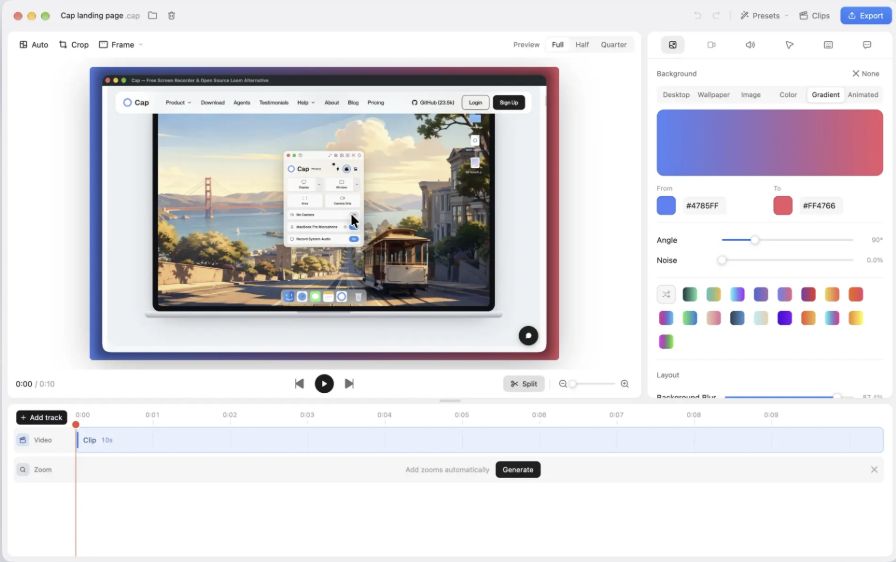
Share instantly or edit and send
Instant mode uploads while you record and copies a shareable link once you stop. In Studio mode, you can save videos locally and trim unnecessary parts, or add features like auto-zoom, backgrounds, and cursor effects.
Version 0.6.2, released on October 28, introduced 'Focus' mode for macOS and Windows, which records only a selected window. This ensures that even if other windows overlap on your screen, they won't interfere with the recording.
Understanding the free tier limits
It is free for personal use, but a paid license is required for commercial use. The free cloud sharing option is limited to 25 videos per month, with a maximum of 5 minutes per video. It's worth checking the specific terms for local recording versus cloud sharing.
This is worth a look if you frequently need to demonstrate your screen, such as for product demos, reproducing bugs, or team onboarding.
